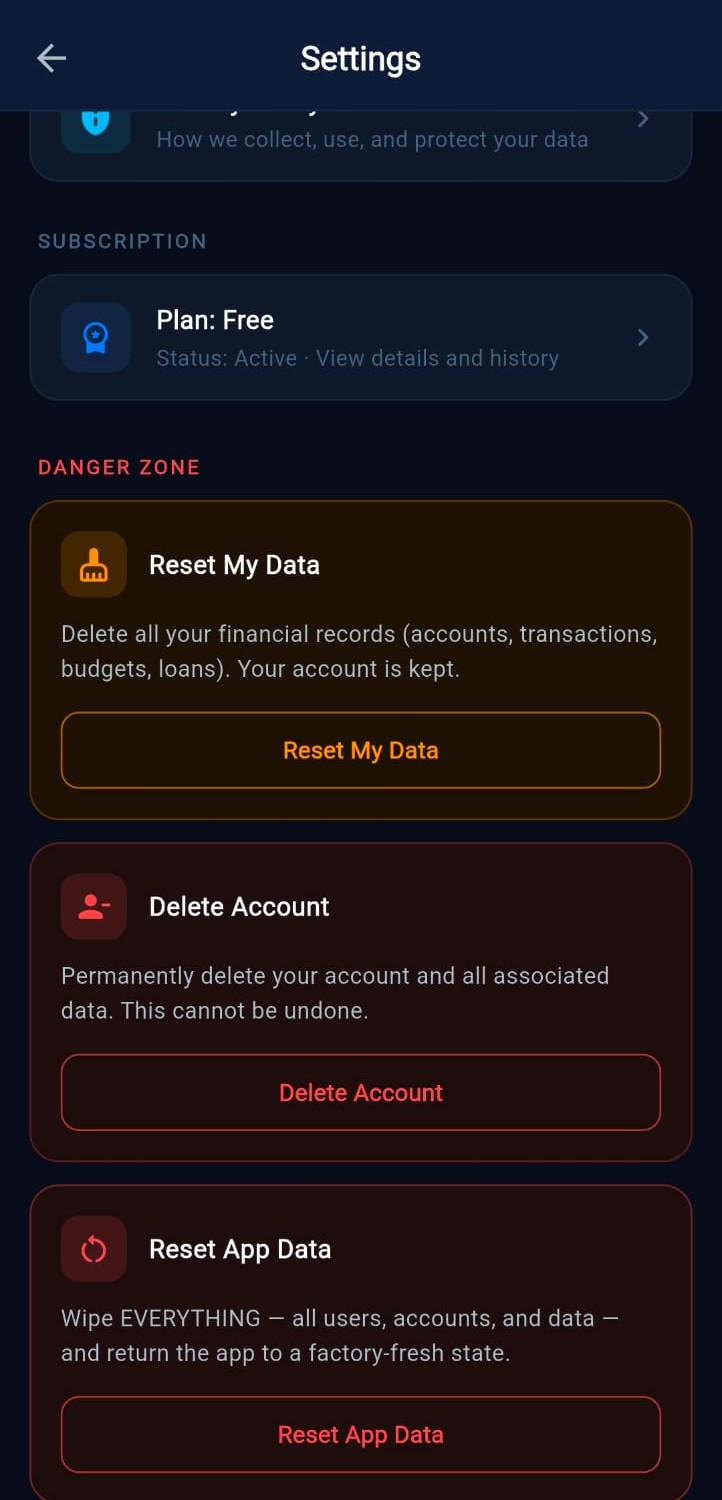
Danger Zone
Data & Account Deletion
You're always in control of your Fintriq data. Choose to reset just your financial records, or permanently delete your account and everything tied to it — directly from the app's Settings screen shown here.
Delete your data only
Keeps your account active
- Open the Fintriq app
- Go to Settings
- Scroll to "Danger Zone"
- Tap "Reset My Data" and confirm
This deletes all your financial records — transactions, accounts, budgets, loans, and categories. Your login account is kept active.
Deleted immediately. Cannot be undone.Delete your entire account
Removes everything, permanently
- Open the Fintriq app
- Go to Settings
- Scroll to "Danger Zone"
- Tap "Delete Account" and confirm
This permanently deletes your account and ALL associated data from our servers within 30 days. You will be logged out and cannot recover your account.
Permanent. Cannot be recovered.
Need help?
fintriqofficial@gmail.com
Contact Fintriq AI
Let's Talk
Have questions, suggestions, partnership ideas, or feature requests? Send us a message and we'll get back to you.
We typically respond within 24–48 hours.
Why Contact Us?
• Feature Requests
• Bug Reports
• Backup & Restore Questions
• AI Assistant Suggestions
• Business Partnerships
• Early Access Programs
• Investment & Portfolio Features
• General Support
• Bug Reports
• Backup & Restore Questions
• AI Assistant Suggestions
• Business Partnerships
• Early Access Programs
• Investment & Portfolio Features
• General Support